Notifications
neomd can fire desktop notifications via notify-send (or any compatible CLI) when specific senders deliver new mail. The list of “notify-worthy” senders is independent of the screener categories — being approved (screened_in) does not automatically mean you want to be paged about it.
Notifications fire from the TUI only. The headless daemon (neomd --headless) screens mail silently so notifications don’t end up on a NAS where no one sees them.
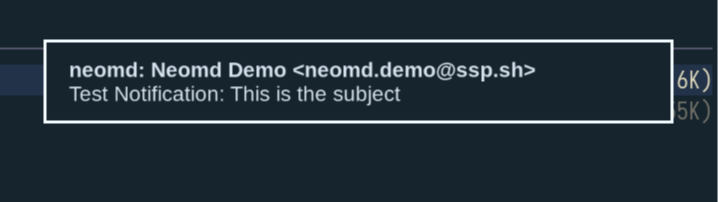
How it looks:
Quick start
Make sure
notify-sendis installed and a notification daemon is running (mako,dunst,swaync, …). On Hyprland with mako:notify-send "neomd" "test"should pop up a notification.
Add the senders (or domains) you care about to
~/.config/neomd/lists/notify.txt, one per line:# exact addresses alice@example.com boss@work.com # whole domain (any address at the domain) @important.orgEnable notifications in
~/.config/neomd/config.toml:[notifications] enabled = true # default: false command = "notify-send" # default icon = "mail-message-new" # default; passed as --icon expire_ms = 5000 # default folders = ["Inbox"] # only fire when the new mail lands hereRestart neomd. The first inbox load records a baseline silently — no notifications fire for the mail you already have. From then on, any new mail whose sender matches
notify.txtand lands in one offolderstriggers a notification.
When notifications fire
A notification is fired when all of the following are true:
[notifications].enabled = true- The email’s UID is greater than the per-folder baseline neomd has recorded (
~/.cache/neomd/notify_state.json) - The sender (after lower-casing) matches an exact entry or
@domainentry innotify.txt - After auto-screening, the email’s destination folder is in
[notifications].folders
If any check fails the email is processed normally but no notification fires.
Domain entries
Same syntax as the screener lists — a line starting with @ matches every address at that domain:
# notify.txt
@ssp.sh
ceo@bigcorp.com
Exact entries match before @domain entries, but for notify.txt the priority doesn’t matter (both produce the same notification). Use whichever is more convenient.
Configuration reference
| Field | Default | Description |
|---|---|---|
enabled | false | Master switch; opt-in. |
command | "notify-send" | Notification binary. See Custom command below. |
icon | "mail-message-new" | Passed as -i/--icon. |
expire_ms | 5000 | Passed as -t. Milliseconds the notification stays on screen. |
folders | ["Inbox"] | Folder labels (case-insensitive) that count for notifications. |
Notification content
Notifications are sent with these arguments:
notify-send -i <icon> -t <expire_ms> -a neomd "neomd: <From>" "<Subject>"Subjects longer than 200 characters are truncated with ….
Custom command
command is passed to os/exec directly with the same positional arguments as notify-send. If you want to use a non-notify-send-compatible notifier (e.g. hyprctl notify, which takes a totally different argument layout), wrap it in a small shell script:
#!/usr/bin/env bash
# ~/.local/bin/neomd-hyprctl-notify
# Usage: <-i icon> <-t expire_ms> <-a app> <title> <body>
shift 6
hyprctl notify 0 5000 "rgb(00ff00)" "$1: $2"
Then in config.toml:
[notifications]
command = "/home/you/.local/bin/neomd-hyprctl-notify"
State file
The per-folder baseline UID is stored at ~/.cache/neomd/notify_state.json (~/.cache/neomd-demo/... for the demo config). Deleting this file forces a re-baseline on next launch (no notifications fire until the next new email arrives).
Why this is opt-in
The default is enabled = false so neomd never surprises a fresh user with desktop popups. Once turned on, the first fetch is also silent — neomd records the highest UID it sees and only notifies for messages newer than that. This way you don’t get flooded with notifications for your entire current Inbox the first time the feature is enabled.