Email Tags (IMAP Keywords)
How tags work
A tag is a label you put on a message, like work, invoice or waiting. There is no fixed set of tags and no hierarchy: you invent the names, and a message can carry any number of them.
- Tags live on the server, not in neomd. Every tag is stored as an IMAP keyword on the message itself (RFC 9051 user flags). This is the standard IMAP tagging mechanism, the same one Thunderbird uses for its message tags, so your tags survive a reinstall, follow the mail when it is moved between folders, and are visible to any other keyword-aware client on the same account. Deleting neomd’s config does not delete a single tag.
- Tags are created in the picker, never in the config. Put the cursor on an email (or mark several with
m), press<space>t, thena, type the name andenter. That creates the tag and applies it in one step. Next time, the tag is in the picker’s list: select it and pressenterorspaceto toggle it on or off (✓= on every selected email,~= on some of them). [tags.<name>]sections only change how an existing tag looks. A section such as[tags.important]sets the chip text (display), colours and visibility for a tag calledimportant. It does not create that tag: until a message actually carries the keywordimportant, the section does nothing. The examples below useimportant,testandhelponly because those are the tag names in the screenshots; use whatever names fit your mail.- Keywords are lowercase, letters, digits,
-,_,.(max 32 chars). Keywords starting with$or\belong to other systems and are never offered or shown: Thunderbird’s five built-in tags ($label1to$label5) stay invisible, while a custom Thunderbird tag has a plain keyword and shows up in neomd’s picker on any message that carries it. Toggle it once from neomd and it renders as a chip from then on. - Filter the list by tag. In the picker,
ftoggles the highlighted tag into the list filter andFclears it; close the picker and only emails carrying any of the active tags remain (one or several tags, OR). The filter is a view mode likezunread-only: it stays on when you switch folders, reload, or open Search / Everything, and the footer showstags: work, invoicewhile it is active.escin the inbox clears it (together with/and unread-only). If the filter hides every row,<space>tstill opens the picker in filter-only mode so you can change or clear it. The filter runs on the loaded window of the folder (inbox_count), like/. - Nothing is automatic. Tags are manual labels per message. Sorting mail by sender is the screener’s job, not tags.
- A local backup exists, per account, at
~/.config/neomd/tags/<account-address>/<keyword>.txt(one Message-ID per line). neomd writes it on every toggle; it is only there in case a provider ever purges unknown keywords. The server is the source of truth.
How they Look: Example
Standard view — the default: plain reverse-video chips before the subject, no special font needed:
[tags]
enabled = true
Nerd-font pills — half-sphere end caps around each chip. Off by default because it needs a nerd font in the terminal: without one the caps render as placeholder boxes. Turn it on with:
[tags]
nerd_pill = true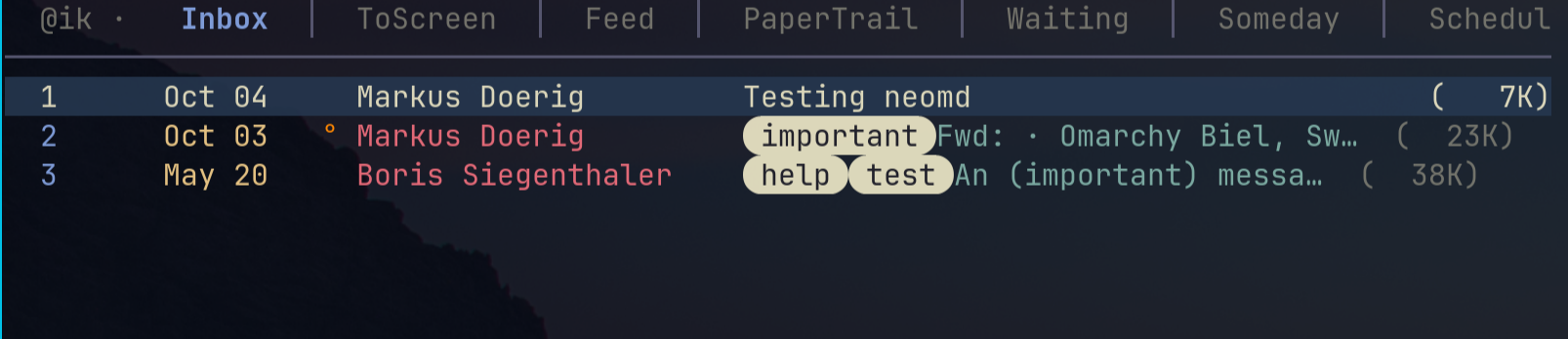
Per-tag display text and colours — one [tags.<keyword>] section per tag you want to customize. The stored IMAP keyword is always lowercase and never changes; only how it displays does:
[tags.important]
enabled = true
display = "Important"
fg = "#FF9900"
bg = "#660000"
Nerd-font glyphs in the display text — put a glyph into display, either pasted literally or as a TOML \uXXXX escape (the escape survives copy-paste, which strips private-use glyphs in many places; find code points at nerdfonts.com/cheat-sheet). Omarchy ships nerd fonts by default:
[tags.test]
enabled = true
display = "\uF0A3 Testing"
fg = "#00FF00"
bg = "#006600"
Compact glyph-only — glyph-only display with bg = "none"; on a transparent terminal the background shows through (tag names are examples, see How tags work):
[tags]
enabled = true
nerd_pill = false

[tags.important]
enabled = true
display = "\uF071"   # nf-fa-warning
fg = "#FF9944"
bg = "none"

[tags.test]
enabled = true
display = "\uF0A3"   # nf-fa-certificate
fg = "#00FF00"
bg = "none"

[tags.help]
enabled = true
display = "\uF059"   # nf-fa-question_circle
fg = "#777777"
bg = "none"
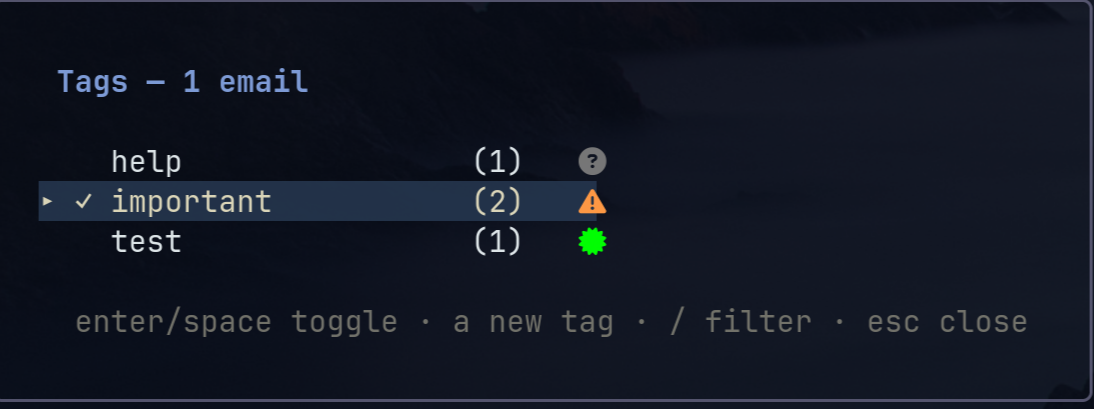
Tag picker — <space>t on the cursor email or a marked set: enter/space toggle a tag (✓ on all targets, ~ on some), a adds a new tag, / filters:
How to activate/configure
Server-side tagging, on by default ([tags] enabled = false turns it off): <space>t on the cursor email or a marked set opens a picker that toggles IMAP keywords — the RFC 9051 tagging mechanism, so tags live on the message, survive reinstalls, and are seen by other clients that support keywords. Tags render as coloured chips before the subject (work by default, or nerd-font pills with nerd_pill = true); per-tag [tags.<keyword>] sections override the display text (nerd-font symbols welcome), colours, and visibility.
For a compact glyph-only look, give each tag a nerd-font display symbol and set mono = true: every chip then renders in the active theme’s muted colour with no background (per-tag fg/bg are ignored, display and enabled still apply), so tags read as quiet markers instead of a rainbow.
enabled = false is the global kill-switch: neither the picker nor any chip renders. The per-tag enabled = false is the fine-grained form — it hides that one tag’s chips while the feature is on — and can never override the global switch.
Every toggle writes through to a local per-account registry at ~/.config/neomd/tags/<account-address>/<keyword>.txt (one Message-ID per line) — the backup if a provider ever purges unknown keywords. Keywords are lowercased and compared case-insensitively; keywords starting with $ or \ belong to other systems and are never offered or rendered.
Provider support varies — run :tt (:tag-test) on an email to probe your server: it stores a test keyword, verifies it via FETCH and SEARCH, and removes it again, with a verdict per step.
PERMANENTFLAGS \*, STORE + SEARCH, persistence across sessions; keywords are invisible but preserved in their webmail). Third-party keywords like $HasAttachment may already live on your messages — neomd never touches or displays them.